Quick answer
Choose dimensions for the placement. Try 1080 × 1440 for a 3:4 photo or 1080 × 1920 for a 9:16 design. YouTube recommends 3840 × 2160 for standard video thumbnails and 2560 × 1440 for a channel banner.
YouTube Help checked November 11, 2026. Instagram and Facebook values are practical starting points. Confirm cropping in the upload preview.
Evidence and accountability: read our testing methodology, contributor profile and editorial and corrections policy. The dated examples are specific tests, not a guarantee for every file or device.
Upload dimensions, on-screen display size and crop-safe space serve different purposes. Export from a clean master and check each placement before posting.
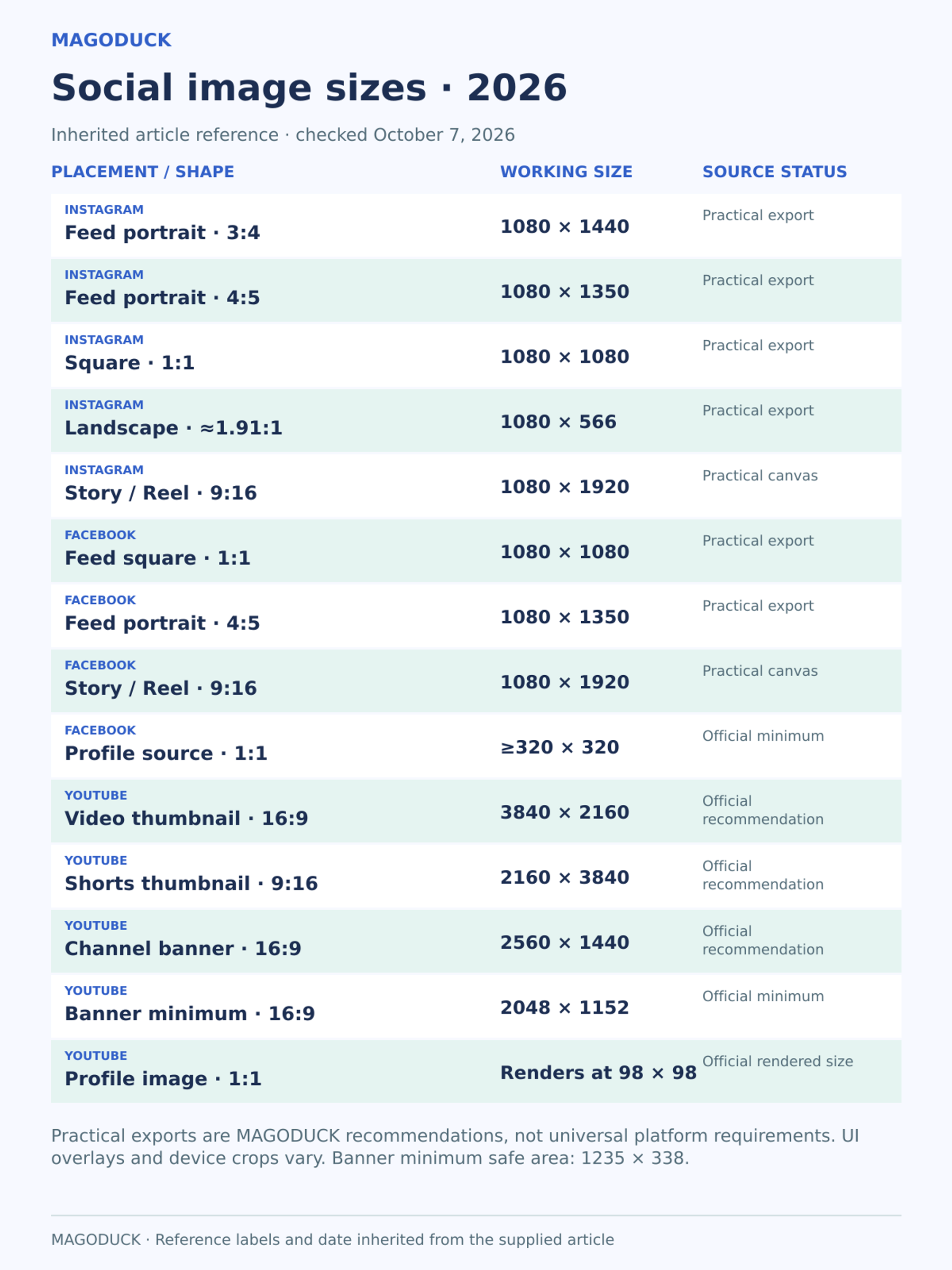
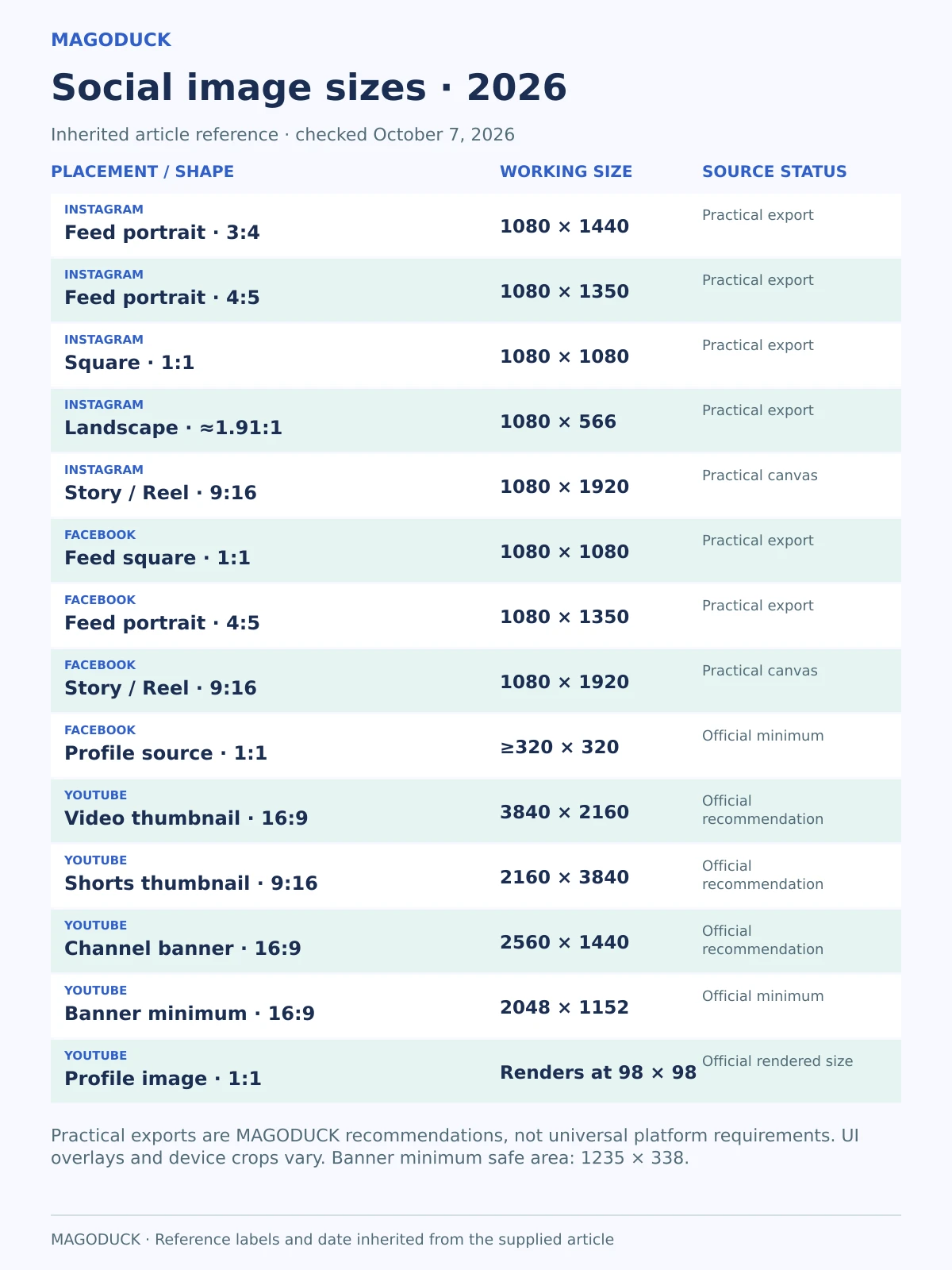
2026 image size cheat sheet
The table separates platform-published guidance from our practical working sizes. A practical size is not a hidden platform requirement; it is a convenient, high-quality export target that matches the placement shape.
| Platform | Placement | Ratio | Working size | Status | Crop note |
|---|---|---|---|---|---|
| Feed portrait | 3:4 | 1080×1440 | MAGODUCK practical | Derived from current 1080px-width handling and supported 3:4 shape. | |
| Feed portrait | 4:5 | 1080×1350 | MAGODUCK practical | Still useful; no longer the only tall portrait choice. | |
| Square | 1:1 | 1080×1080 | MAGODUCK practical | Predictable square composition; grid preview behavior can differ. | |
| Landscape | ≈1.91:1 | 1080×566 | MAGODUCK practical | Calculated from a 1080px working width. | |
| Story / Reel canvas | 9:16 | 1080×1920 | MAGODUCK practical | Keep important content clear of app UI; exact overlays vary. | |
| Feed square | 1:1 | 1080×1080 | MAGODUCK practical | Facebook can reprocess uploaded photos. | |
| Feed portrait | 4:5 | 1080×1350 | MAGODUCK practical | Useful vertical working size, not a universal official requirement. | |
| Story / Reel canvas | 9:16 | 1080×1920 | MAGODUCK practical | 9:16 aligns with Meta’s vertical Reels creative guidance. | |
| Profile source | 1:1 | ≥320×320 | Official minimum | Use a larger square master when available. | |
| YouTube | Video thumbnail | 16:9 | 3840×2160 | Official recommendation | Minimum width 640px. |
| YouTube | Shorts thumbnail | 9:16 | 2160×3840 | Official recommendation | Minimum height 640px. |
| YouTube | Channel banner | 16:9 | 2560×1440 | Official recommendation | Different devices crop the banner differently. |
| YouTube | Banner minimum | 16:9 | 2048×1152 | Official minimum | At this size, official text/logo safe area is 1235×338. |
| YouTube | Profile image | 1:1 | Renders at 98×98 | Official rendered size | Do not design only at 98×98; upload a clean larger square source. |
The image version is a supplement to the accessible table above, not the only copy of the numbers.
Why social-media image sizes keep changing
Three things move independently: the supported aspect ratio, the platform’s pixel processing, and the preview crop used by a particular surface. A file can be accepted perfectly in the feed yet look tighter in a profile grid, recommendation shelf or device-specific banner view.
That is why a useful 2026 guide cannot be a pile of pixel numbers. You need the shape, the source resolution, and enough safe space around critical content.
Pixels vs aspect ratio: what actually matters?
Aspect ratio determines shape. Pixel dimensions determine raster resolution. A 1:1 image can be 500×500, 1080×1080 or 2000×2000. They have the same shape, but not the same detail or file weight. Start with the target ratio, then choose an export size that is large enough without sending an unnecessarily giant file.
Instagram image sizes in 2026
Instagram now supports 3:4 photos
For a portrait photo, try a 3:4 crop and inspect both the feed and profile preview. The Instagram Help page is linked below for its current acceptance range.
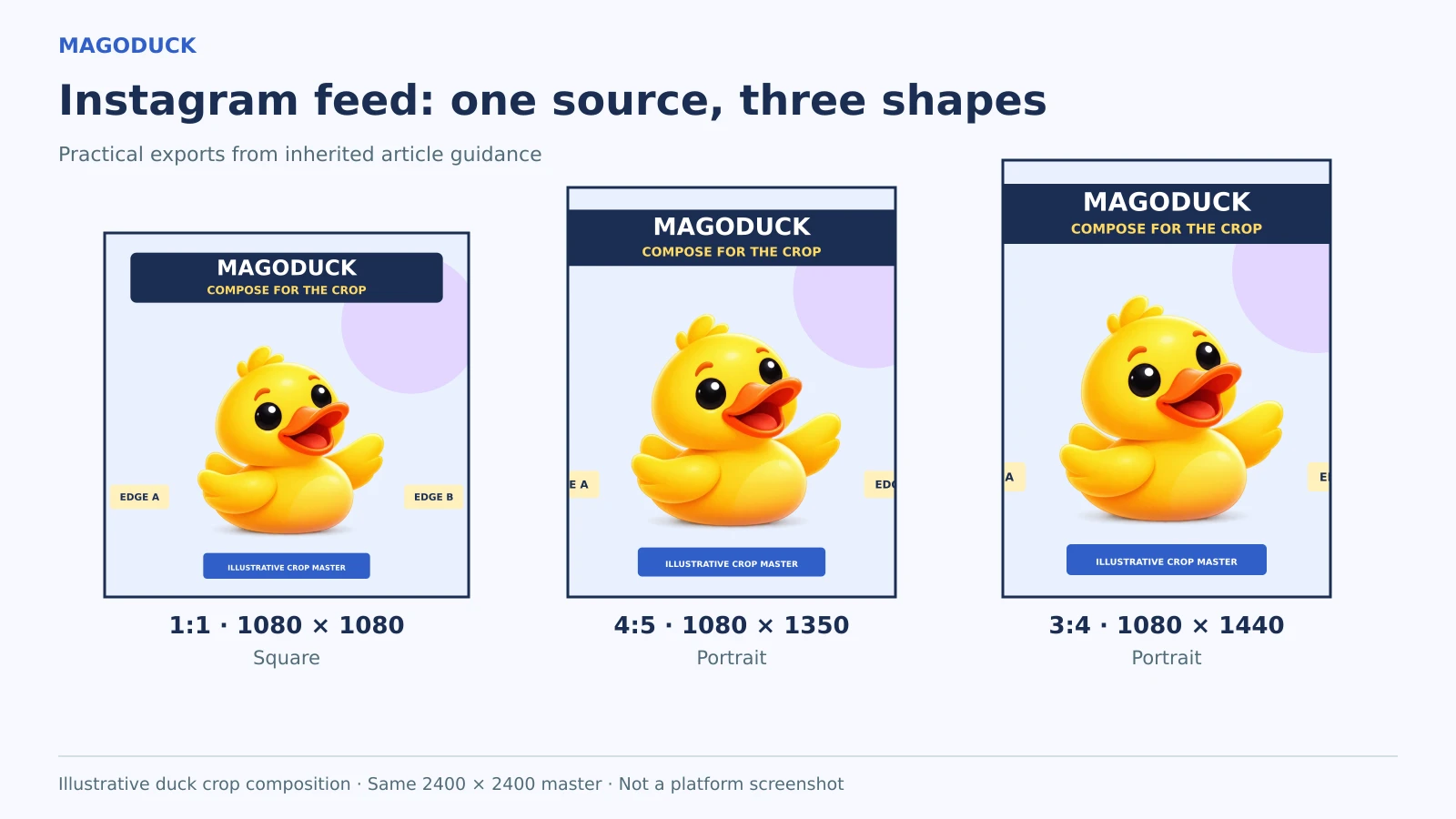
For a practical 1080px-wide export, 3:4 works out to 1080×1440. That is a MAGODUCK calculation from the supported ratio and the familiar 1080px working width—not a claim that Instagram publishes those exact two numbers as a mandatory size.
Is 1080×1350 still good?
Yes. 1080×1350 (4:5) remains a useful portrait export. The important correction is that 4:5 is no longer the only native tall-photo option. Choose 3:4 when it better matches the camera framing; choose 4:5 when you prefer that crop.
Feed image vs profile-grid preview
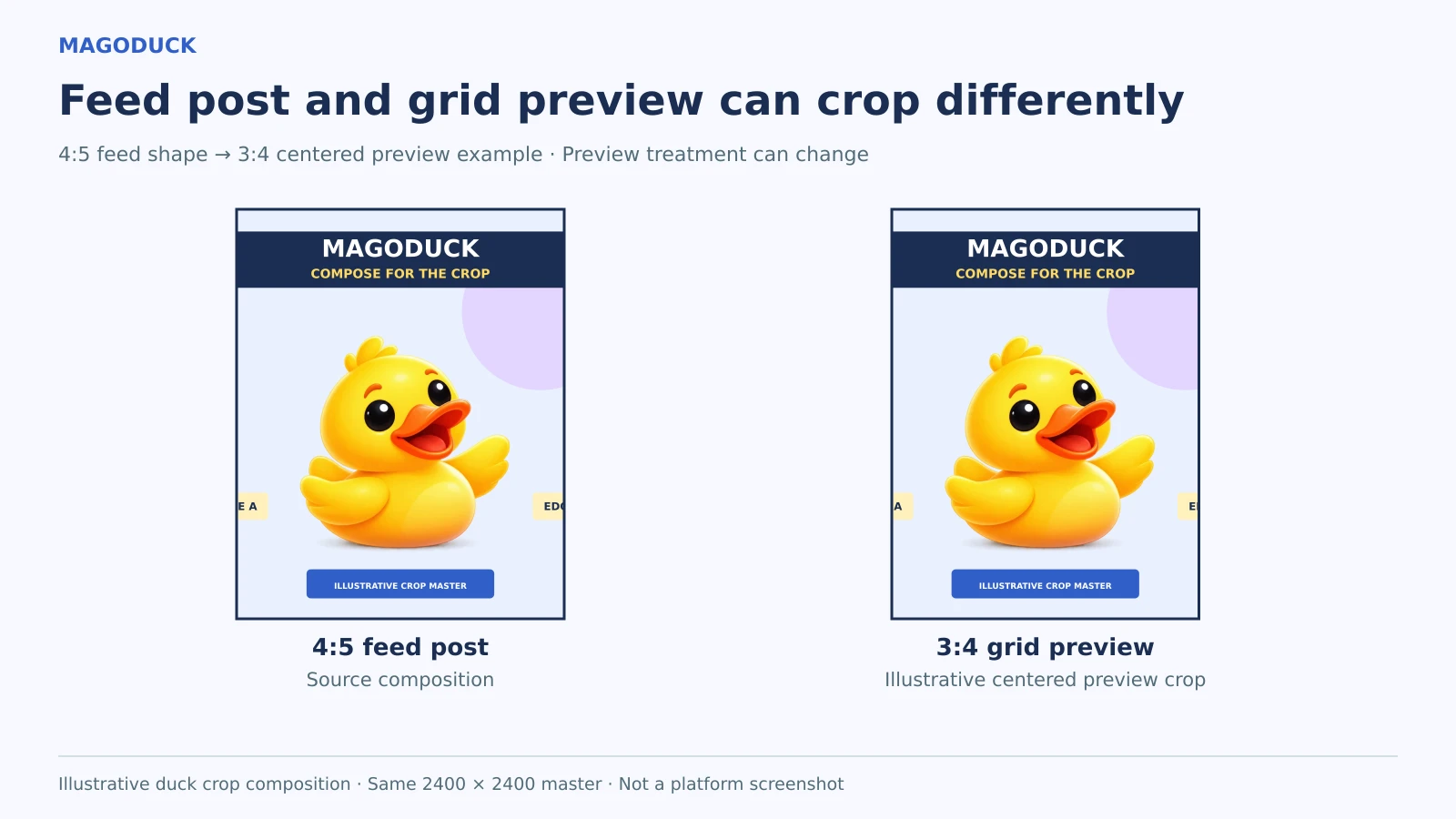
The uploaded photo and the profile-grid preview are separate presentation problems. Instagram has changed its grid treatment over time, and current 2026 layouts favor taller previews than the old square-only grid. The safest design habit is to keep faces and essential text away from the extreme edges even when the feed post itself uses 3:4 or 4:5.
Instagram Stories and Reels
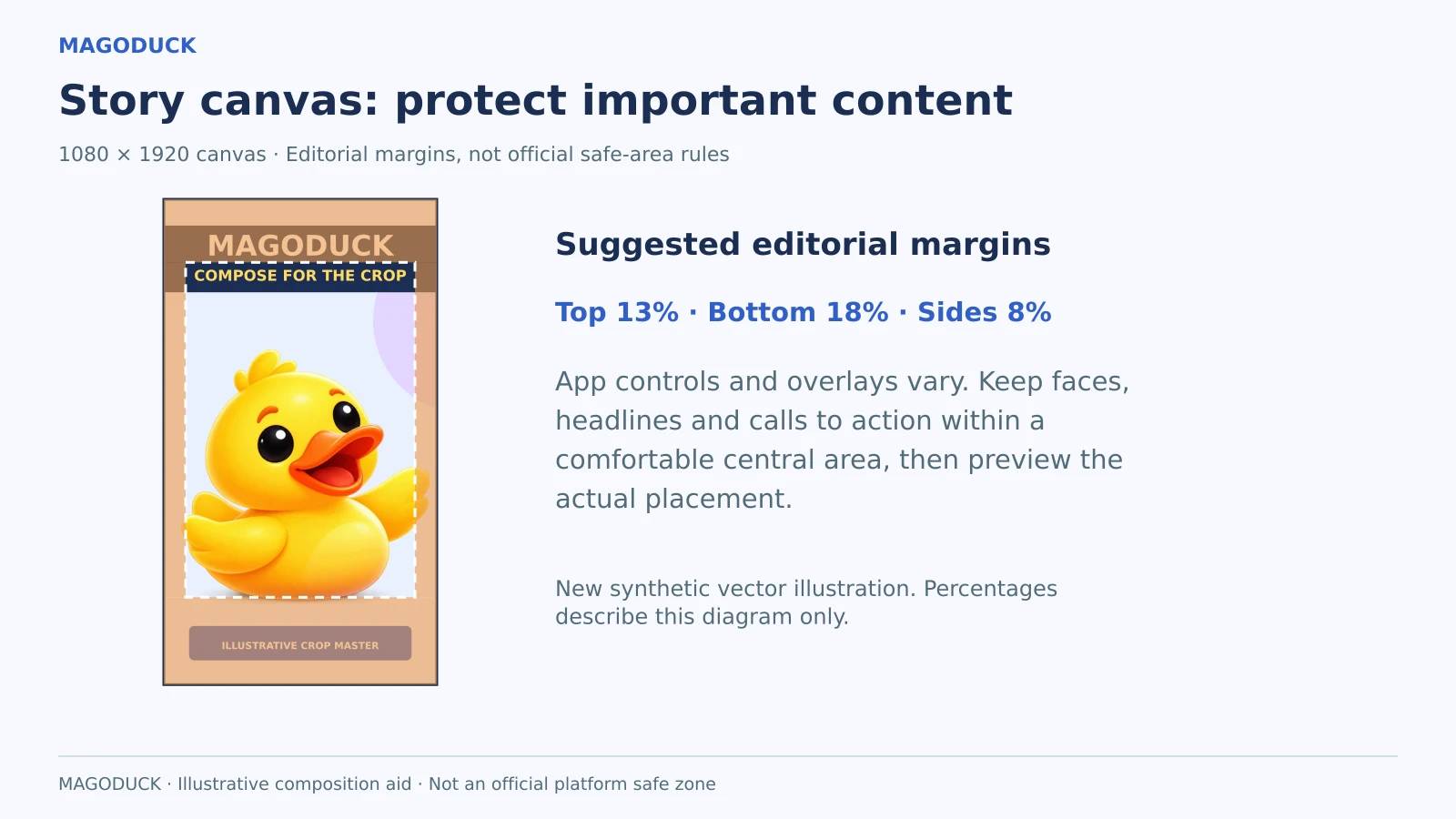
A 9:16, 1080×1920 canvas is a practical full-screen working size. But the visible image is not a blank rectangle: usernames, captions, buttons and navigation can cover parts of it. Instagram does not give us a universal pixel-safe-zone that remains identical across every phone and UI version, so the shaded margin in our figure is intentionally labeled an MAGODUCK practical working margin, not an official zone.
Facebook image sizes in 2026
There is no single official “best Facebook post size”
Facebook feed previews can crop a source differently depending on placement and device. Use the working sizes below to make a draft, then preview it on the account where you will publish.
Our practical exports are 1080×1080 for square creative and 1080×1350 for a tall 4:5 feed version. They are working recommendations, not hidden Meta requirements.
Facebook Stories and Reels
For vertical full-screen creative, 9:16 is the right shape to design around. Meta’s Reels creative guidance uses 9:16, but the same caution applies here: app UI can obscure edge content, so do not push a logo or headline against the top or bottom boundary.
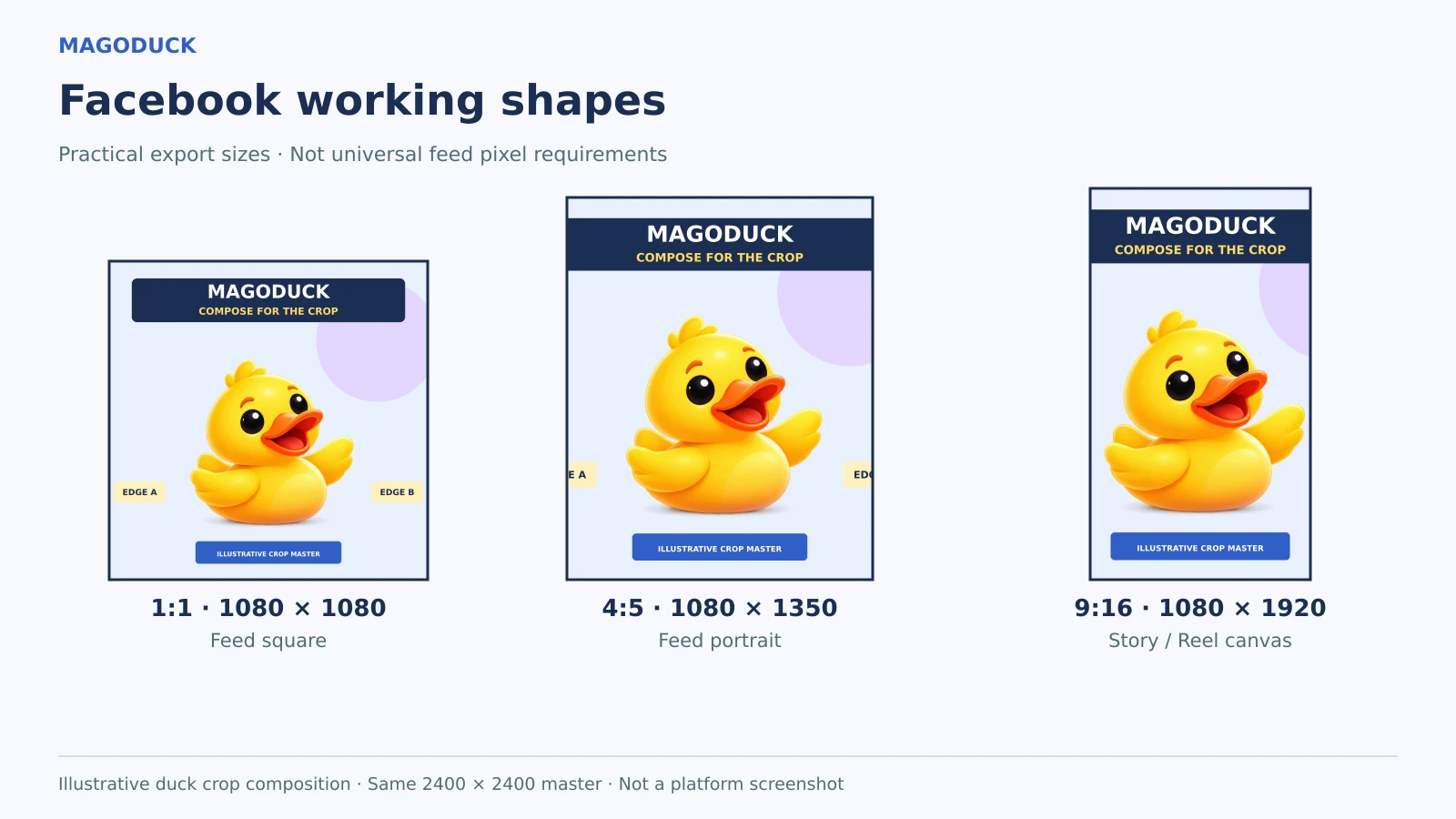
Facebook profile and cover images
Start from a clean square image and keep the subject centered so a circular crop works. The Facebook Page help link below lists the current platform guidance.
For cover images, avoid blindly copying a legacy fixed number from old Page layouts. Use a high-resolution wide master, center anything critical, and inspect the real desktop/mobile preview on the account you publish to. Live Facebook cover cropping was not tested for this build.
YouTube image sizes in 2026
YouTube video thumbnails: 3840×2160 is the current recommendation
This is one of the biggest stale-guide traps. Many older articles still repeat 1280×720. YouTube Help currently recommends 3840×2160 for standard custom video thumbnails, with a 16:9 ratio and a minimum width of 640 pixels. The old 1280×720 size is still a valid 16:9 raster size; it is simply not the current official recommendation stated on the Help page.
YouTube also currently recommends 2160×3840, 9:16 for Shorts custom thumbnails, with a minimum height of 640 pixels. YouTube notes that vertical videos using a 16:9 custom thumbnail can receive an auto-generated 4:5 thumbnail on Home, Explore and Subscriptions, while the custom image remains visible in other surfaces.
The figures use the current YouTube Help recommendations for video thumbnail dimensions. Recheck the upload limits on the device you will use.
YouTube Help lists different thumbnail file-size limits for mobile and desktop. For Shorts, check the thumbnail controls available in your publishing workflow before designing a custom image.
YouTube channel banner
YouTube recommends 2560×1440 for a channel banner and lists 2048×1152 as the minimum 16:9 upload. At that minimum size, the official safe area for text and logos is 1235×338. The banner is cropped differently on different devices, so the practical design lesson is more important than the canvas itself: keep branding in the central safe region.
Use the official 1235 × 338 text and logo area on the 2048 × 1152 minimum banner. Keep key details central and use YouTube’s previews to verify crops on your larger working canvas.
YouTube profile image
YouTube’s branding guidance says the channel profile image renders at 98×98 pixels. That is a rendered display size, not a good authoring canvas. Build a larger square source with simple detail so it survives downscaling.
Illustrative MAGODUCK cross-platform crops
The figures below use one 2400×2400 synthetic vector master with a geometric subject, headline and edge markers. Centered crop windows illustrate how aspect ratio changes composition. They explain geometry; they are not photographic measurements, live platform screenshots or proof of account-specific behavior.
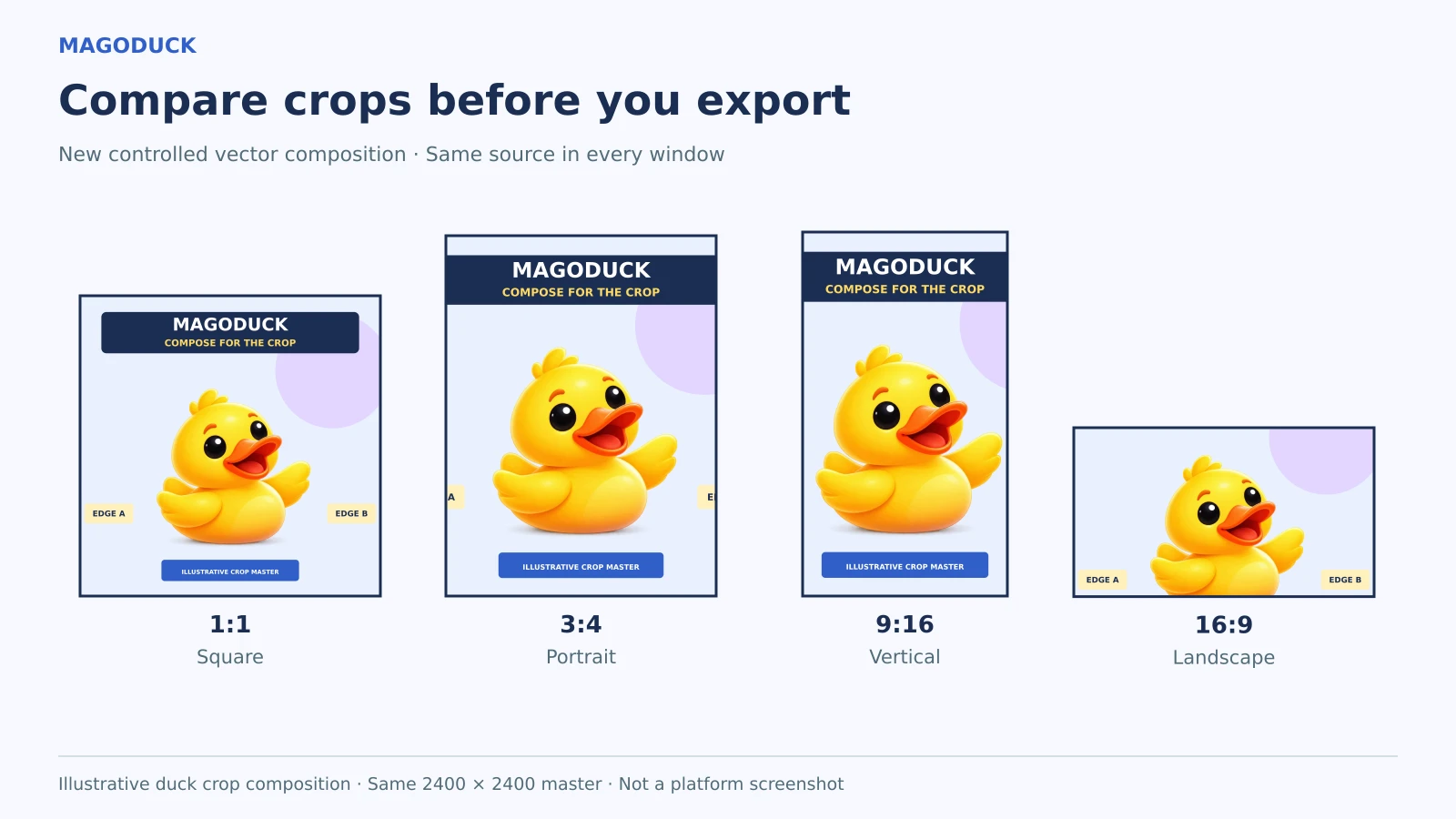
Why one image does not fit every platform
A square master can look balanced on a feed card, then lose the headline in 16:9 or place a face too close to the edge in 9:16. Scaling the same square into every slot is not a workflow; it is a crop lottery. Keep a high-resolution master, duplicate it, then crop and reposition for each placement.
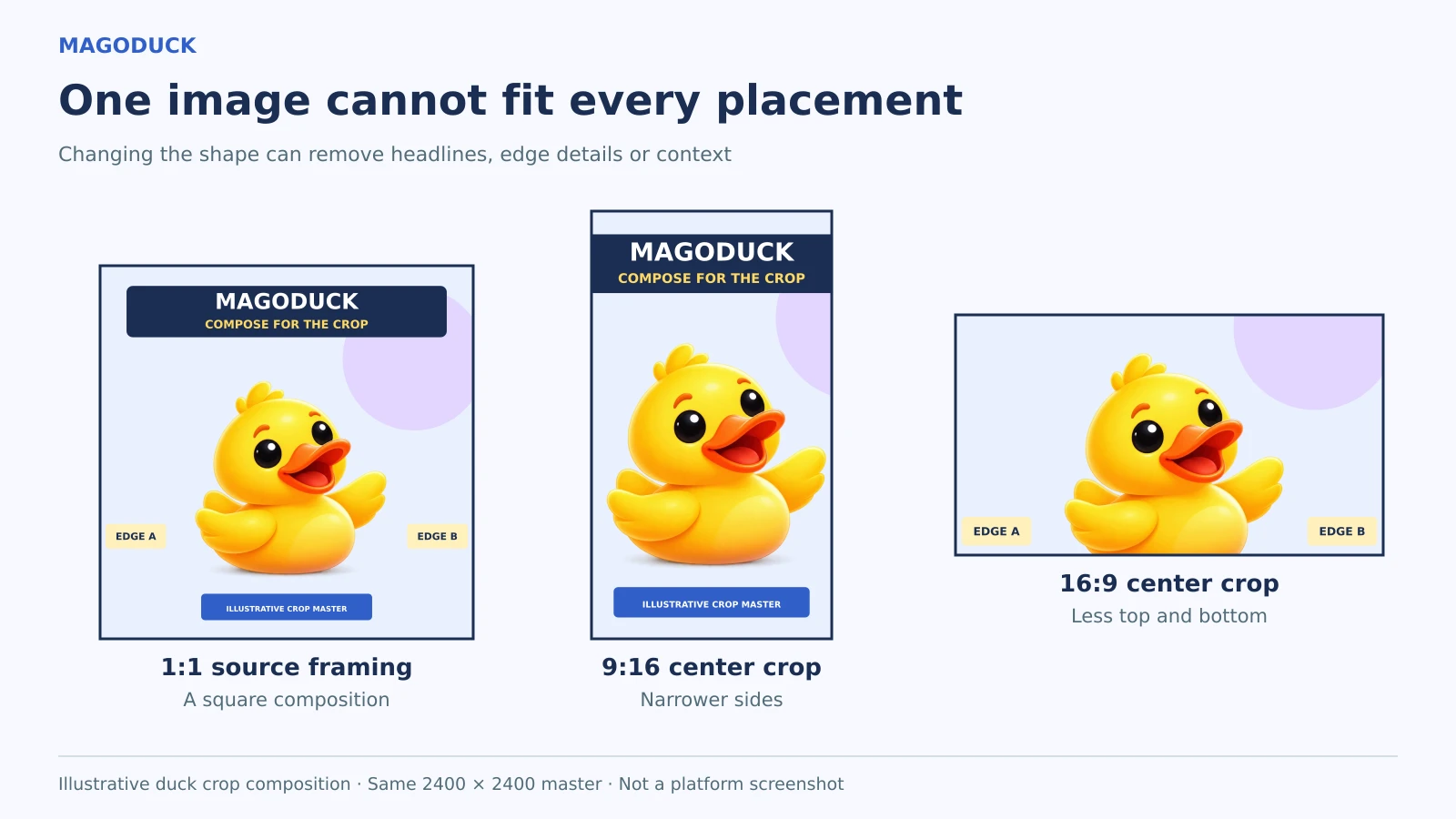
Safe zones: official rule or practical margin?
The label matters. YouTube publishes a numeric channel-banner safe area, so we can call that an official safe area. For Stories/Reels-style UI overlays, the exact visible area can vary by app version, device and placement. Our overlays are therefore MAGODUCK practical working margins. They are intentionally conservative, not fake platform specifications.
How much resolution do you actually need?
Bigger is not automatically better. An enormous source can increase upload weight and still be resized by the platform. A too-small source can look soft after display scaling. The practical target is enough pixels for the placement plus a clean source, not the largest file your phone can produce.
For Instagram and Facebook feed exports, a 1080px working width is a sensible practical baseline for the common shapes in this guide. For YouTube thumbnails and banners, use the larger dimensions YouTube currently publishes because those are explicit first-party recommendations.
Should you use JPG, PNG or WebP?
JPG is a sensible choice for photographic artwork. PNG is useful for graphics, text-heavy art and transparency when the destination accepts it. YouTube explicitly names formats such as JPG and PNG for thumbnails. Do not assume WebP uploads are accepted everywhere merely because WebP is excellent for websites; check the actual upload destination before using it.
How to resize without making images blurry
- Start from the original or a high-resolution master, not a small derivative.
- Crop to the target ratio before final resizing.
- Reposition the face, logo and headline after the crop instead of accepting automatic centering.
- Export once at the target dimensions and inspect it at actual mobile size.
- Keep the master so you can regenerate future platform versions without repeated resampling.
A practical social-image export workflow
Use the Social Media Image Resizer for presets. Use the Image Cropper when you need to position the subject precisely.
- Keep one high-resolution master.
- Duplicate for each placement. Do not overwrite the master.
- Crop to the target ratio.
- Reposition important content. Treat edge text as disposable until proven safe.
- Resize to the working dimensions.
- Export an appropriate format and efficient quality.
- Inspect at phone size. Small text that looks fine on a desktop may be useless in a feed.
- Preview on the real platform before a critical campaign. Simulations cannot guarantee a future UI crop.
Common mistakes
- Calling every number “official” when it is only a popular design convention.
- Using old 4:5-only Instagram portrait advice and ignoring native 3:4 support.
- Calling 1280×720 YouTube’s current recommended thumbnail resolution without rechecking YouTube Help.
- Designing a YouTube banner edge-to-edge without respecting the central safe area.
- Using the same square artwork unchanged for Stories, Shorts and widescreen thumbnails.
- Assuming a larger pixel file guarantees reach or algorithm preference. It does not.
- Placing a face, logo or CTA against an edge that can be cropped or covered by UI.
Platform-by-platform decision table
| If you are making… | Start with… | Then check… |
|---|---|---|
| Instagram feed photo | 3:4, 4:5 or 1:1 composition | Profile-grid preview and edge-safe subject placement |
| Instagram Story/Reel | 9:16, 1080×1920 practical canvas | UI overlays on the current app |
| Facebook feed creative | 1:1 or 4:5 practical export | Real feed preview after platform processing |
| YouTube video thumbnail | 3840×2160, 16:9 | Mobile readability and small-screen subject clarity |
| YouTube Shorts thumbnail | 2160×3840, 9:16 | Which YouTube surface will display it |
| YouTube banner | 2560×1440 | Central text/logo safe area and multi-device crop |
How the crop illustrations were prepared
Use the examples to plan a composition, then compare the result in the current upload preview.
The editable composition uses a 2400×2400 coordinate space with generated duck artwork. Its subject and edge markers stay in place while centered windows show different shapes. Each illustration labels its purpose.
The illustrations show composition. Use the linked guidance and the current upload preview. This redraw did not repeat authenticated live uploads or refresh those requirements. Recheck linked first-party guidance and the destination account preview before publishing.
Sources
- Instagram Help on shared photo resolution
- Facebook Help on Page profile and cover images
- YouTube Help on thumbnail dimensions and formats
- YouTube Help on channel banners and profiles
Short FAQ
Why does my Facebook cover or YouTube banner look cropped on a phone?
The visible area can change by screen size and placement. Keep important faces and text near the center, then check the preview on a phone and desktop.
What size should an Instagram post be in 2026?
There is no single size for every feed post. Useful 1080px-wide exports include 1080×1440 for 3:4, 1080×1350 for 4:5 and 1080×1080 for square. These are practical exports matched to supported shapes.
Does Instagram support 3:4 photos?
Yes. Instagram added native 3:4 photo support in 2025, and current 2026 guidance supports the taller shape. 4:5 and square remain useful choices.
Is 1280×720 still YouTube’s recommended thumbnail size?
It is still a valid 16:9 image size, but it is not the current official recommendation on YouTube Help. As checked November 11, 2026, YouTube recommends 3840×2160 for standard custom video thumbnails.
What size is a YouTube banner?
YouTube recommends 2560×1440. The minimum is 2048×1152, and at that minimum the official safe area for text and logos is 1235×338.
Can I use the same image everywhere?
You can reuse the same master artwork, but do not reuse the same finished crop. Duplicate the master, then adapt subject and text placement to each target ratio.
Editorial transparency: This guide was drafted with AI assistance. Aspect-ratio calculations and illustration crops are examples, not authenticated social-network upload tests. Platform requirements and previews can change: use the linked first-party help pages and inspect the current publishing screen before relying on a size.
The practical rule
Design for the placement, not for a mythical universal social-media size. Keep a high-resolution master, crop separately for each destination, respect known safe areas, label practical recommendations honestly, and recheck platform guidance before important publishing work.